
Every Praxflow feature
In Local today, in Cloud soonPraxflow Local and Praxflow Cloud are the same application. Every feature on this page is in Praxflow Local today and will be the same in Praxflow Cloud, coming soon.
Hover over a tooth or choose a quadrant. The marks are as in the application: caries on 16, a completed procedure on 26, a planned implant on 36.
A chart that looks like teeth.
Anatomical illustrations in FDI notation. Select a tooth or a surface to record a finding or a procedure.
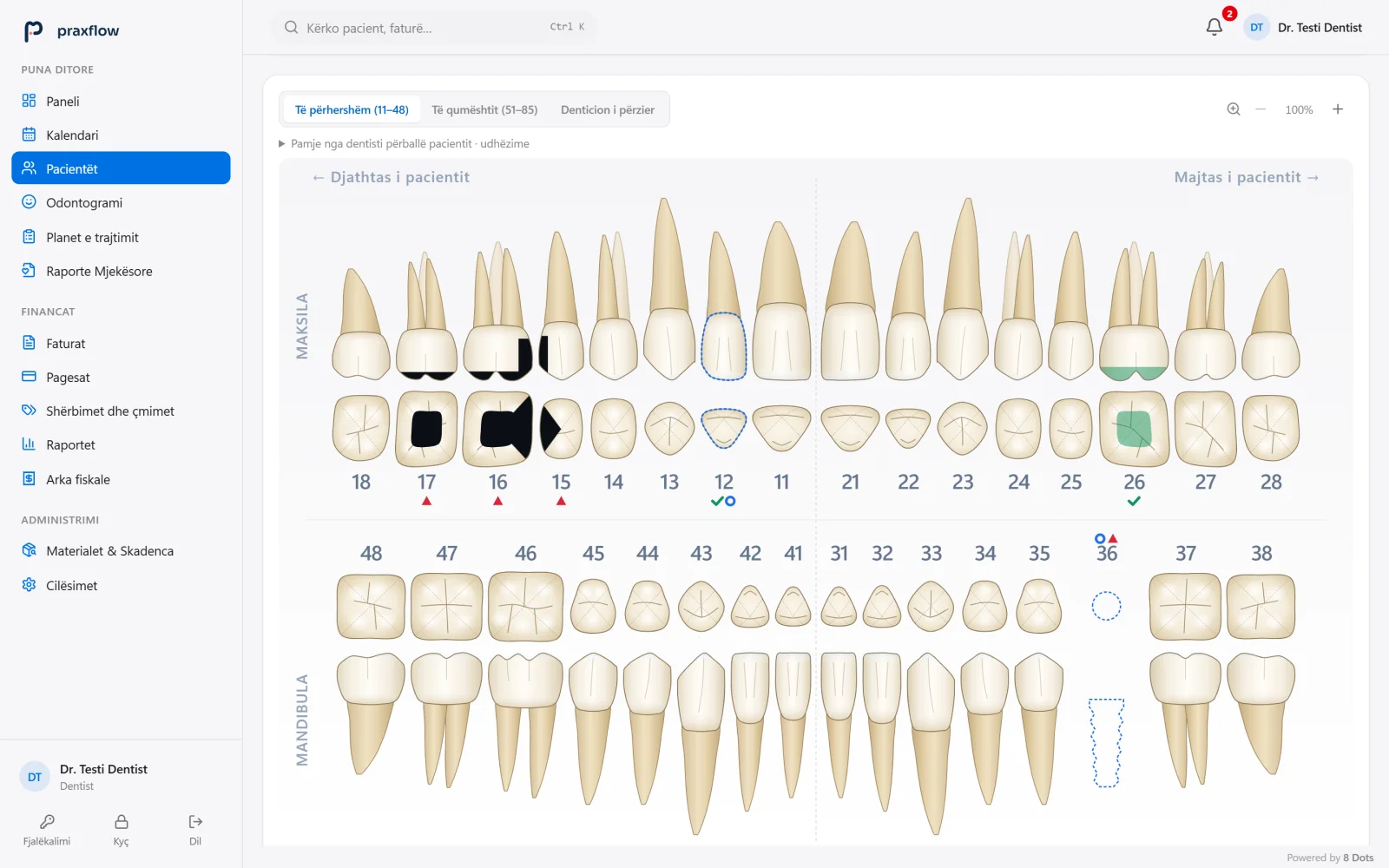
- DentitionPermanent teeth (11–48), primary teeth (51–85) or mixed dentition.
- Finding per tooth and surfaceActive caries is marked only on the affected surface. Every entry is made by the dentist; the system does not diagnose.
- Completed and plannedA completed procedure gets a ✓. A missing tooth and a planned implant appear on the chart and in the treatment plan.
Patient managementEvery patient in one record
Personal and contact details, medical history, treatment, appointments, finances, documents and photos, in tabs of the same record.
- Allergy warning at the top of the record
- Clinical summary above every tab
- Patient search from any screen
Medical history and allergiesThe medical history, always in sight
A structured, versioned medical history, with allergies and current medication visible before every treatment.
- Questions by body system, from cardiovascular to endocrine
- Earlier versions are kept and can be viewed
- View and print the medical history
Anatomical odontogramA chart that looks like teeth
Anatomical illustrations in FDI notation. Findings and procedures are recorded per tooth and per surface.
- Permanent, primary or mixed dentition
- Findings at surface level
- Every entry is made by the dentist; the system does not diagnose
Treatment planFrom proposal to completed
Each procedure carries its teeth, responsible dentist, price and status. Once completed, it creates its own financial entry.
- Procedures from the odontogram or the price list
- Accepted, started or completed
- Price changes and cancellations are kept in the plan’s history
Appointment managementAn organised week, without double bookings
A calendar for every dentist, with search and filters. A dentist’s occupied time cannot be booked twice.
- Day, week and month views
- Filters for dentist and status
- The session starts straight from the appointment
Medical reportsDocuments ready to print
Medical reports, sick-leave certificates and prescriptions, issued from the patient record.
- Separate numbering for each document type
- In Albanian or English
- View, print and download
One visit. From appointment to payment.
Six steps, one flow. Each step takes its information from the one before, so nothing is written twice.
- 21
Appointment
The appointment is booked in the calendar. A dentist’s occupied time cannot be booked twice.
Booked in the calendar - 22
Medical history
The medical history and allergies are updated and shown at the top of the record.
Allergies in sight - 23
Session
The dentist starts the session from today’s appointment; the record opens on the Treatment tab.
Record ready - 24
Odontogram and plan
Findings are recorded per tooth and surface; planned procedures enter the treatment plan.
Procedure in the plan - 25
Completed procedure
The procedure is marked as completed and moves to realised treatments.
Financial entry - 26
Invoice and payment
The invoice is issued, the payment recorded and the balance updated. Closing the session marks the appointment as completed.
Accurate balance
A completed procedure creates its own financial entry.
When the dentist marks a procedure as completed, its financial entry is created from the procedure itself. Nobody re-types the procedure for billing, so what was done in the chair and what is invoiced stay the same.
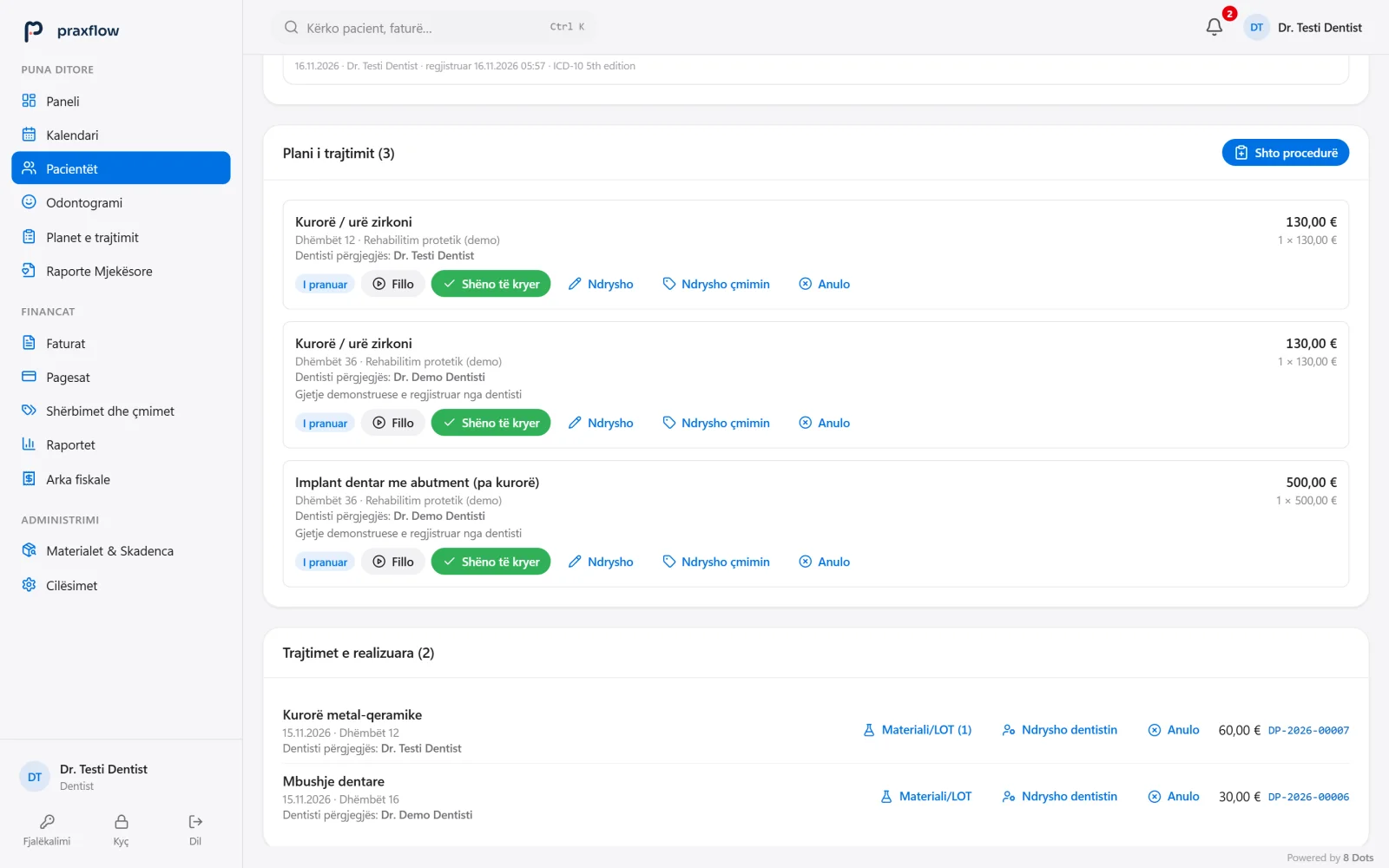
- Status and actionsAccepted, started or completed. Price changes and cancellations are kept in the plan’s history.
- Realised treatmentsA completed procedure moves to realised treatments, together with its financial entry.
Every payment, documented.
Invoices with continuous numbering, full or partial payments, and the unpaid balance for each patient.
Financial reportsFigures you can explain
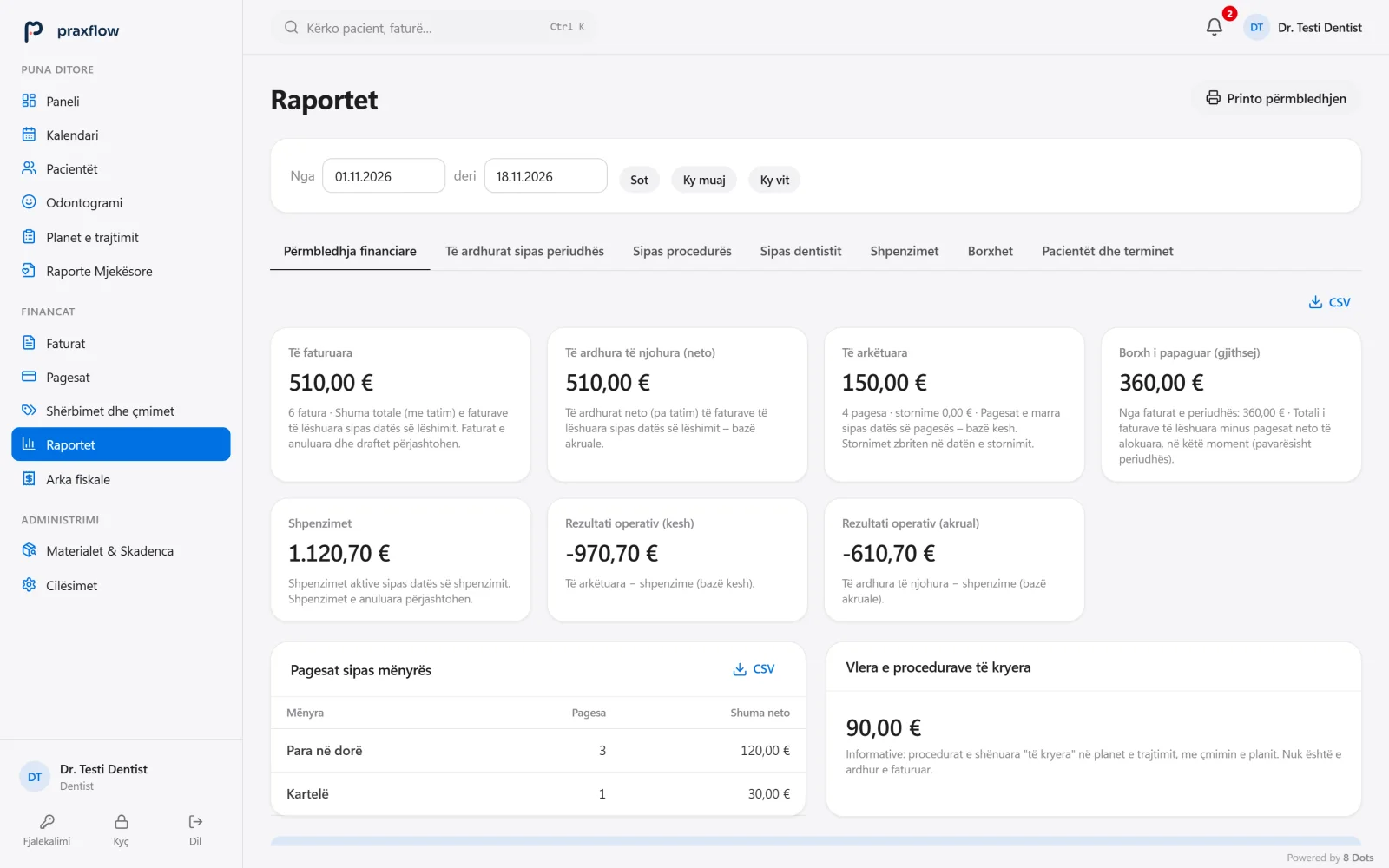
Invoiced, recognised and collected amounts, expenses and balances for any period, each with its calculation basis.
Invoices and paymentsIssued invoices cannot be edited
Payment status and method for every invoice. Corrections are made by reversal.
Materials and expiryNo expired material on the shelf
Manufacturer, LOT, quantity and expiry date, with a notice 7 days before items expire.
PrintingA4, A5 or thermal paper
The format is chosen for each type of document. Invoices can also be printed in 80 or 58 mm thermal format, with the clinic’s logo and contact details.
Sample St 1 · Tel 044 000 000
Sample with demonstration data. The fiscal receipt is issued by the clinic’s fiscal cash register.
Administration and security in the application
Who signs in, what they see and what stays traceable. The same logic in Local and in Cloud.
Users and rolesEveryone sees what they need
Every staff member has their own account, with permissions by role: administrator, dentist or reception.
- Reception cannot read the medical history or clinical notes
- The administrator cannot read clinical data
- Automatic lock after inactivity
Sign-inA personal account for every staff member
Passwords are stored as Argon2id hashes. After five failed attempts, sign-in is blocked for 15 minutes.
- A recovery code for the administrator, shown only once
- The lock screen covers the data until the password is entered again
Audit logNothing disappears without a trace
Issued invoices, payments and finalised clinical records cannot be changed. Corrections are stored with author, time and reason.
- Cancelled records stay in the database and the audit log
- Changing the dentist after completion needs authorisation and a reason
- Permanent deletion only by the administrator, with a reason and password
BackupsEncrypted backups, controlled restore
Backups are encrypted with AES-256-GCM and verified after they are created. Before every restore, a copy of the current state is made automatically.
- A reminder when the backup is missing or older than 7 days
- A restore is fully checked before it replaces the data
- A database integrity check
SettingsSet up for your clinic
The clinic name, logo and letterhead, the price list, the odontogram colours and the print format for each type of document.
- The clinic name on the sign-in screen
- The clinic letterhead and logo on printouts
- The print format saved per document
Praxflow holds no security certifications and claims no legal or fiscal compliance. The clinic verifies its data protection and fiscalisation obligations with its own lawyer and accountant.
Every feature, grouped.
Everything in the current version of Praxflow. What is not ready yet is marked below, under Status.
Patients
- Registration and search by name, patient number or phone
- A patient list with filters and paging
- A warning about possible duplicate patients during registration
- A patient record with tabs: details, medical history, treatment, appointments, finances, documents
- The allergy warning and clinical summary at the top of the record
- Documents and photos attached to the record
- Patient consents, ready to print
- A printable patient record
Medical history and clinical notes
- Present illness, family history, past medical history, lifestyle and habits, other concerns
- Versioned: every change is stored with date and user
- Allergies and current medication, visible before every treatment
- View, print and PDF of the medical history
- Clinical notes, findings, diagnoses and procedures, from draft to final
- Diagnoses with ICD-10 codes
- Corrections are stored as a new version
Odontogram
- Anatomical illustrations in FDI notation, 11–48 and 51–85, with crown, root and occlusal view
- Permanent, primary or mixed dentition
- Findings and procedures on the tooth and on the surface
- Conditions, planned and completed work by colour, pattern and symbol
- Configurable colours
- Dental bridges, step by step, with pontics
- Fixed orthodontic braces: metal, ceramic or lingual
- Endodontic treatment: devitalisation or medication
- The patient’s aesthetic requests, recorded as findings
- The history of every tooth and traceable corrections
Treatment plan and visit
- Several procedures in one plan, with teeth, responsible dentist and price
- Procedures from the odontogram or from the price list
- Statuses: proposed, accepted, started, completed
- Price changes and cancellations in the plan history
- Today’s visit starts from the appointment and ends with a summary and payment
- A completed procedure creates its own billing item
- The plan printed with the patient’s consent
Appointments
- Day, week and month calendar
- A calendar for each dentist, with filters by dentist and status
- A dentist’s booked time cannot be booked twice
- Statuses: scheduled, confirmed, completed, cancelled, no-show
- The change history of every appointment
- Past appointments are closed from the daily tasks
- Google Calendar sync, optional for each dentist: only the time and the clinic’s name and address, without the patient’s name or clinical data
Invoices and payments
- Invoices from draft to issue, with a unique, sequential number
- Discounts and configurable tax
- Full or partial payments and advance payments
- Reversals, cancellations and corrective invoices
- Outstanding balance and the patient’s financial statement
- Issued invoices cannot be changed
Expenses and services
- Expenses by category and supplier
- Purchase invoices attached
- An editable price list of services in euro
Reports and analytics
- Daily, monthly and yearly revenue
- Collections, outstanding balances and expenses
- Procedures, new patients, cancellations and no-shows
- Operating result, with the calculation basis of every figure
- CSV export and printing
- Business analytics with pivot tables
- The monthly summary on the dashboard
- Dentists see only their own data
Documents and printing
- Medical reports, sick-leave certificates and prescriptions
- Separate numbering for each type of document
- In Albanian or in English
- A4, A5 or 80 and 58 mm thermal paper, depending on the document
- The clinic letterhead and logo on printouts
- View, print and download
Materials
- Inventory with manufacturer, LOT, quantity and expiry date
- Expiry status for every item
- A notification 7 days before expiry
Everyday work
- A dashboard per role: today’s appointments, collections, outstanding balances, new patients
- Daily tasks: open appointments, expiring materials, a missing backup
- Global search with Ctrl+K: screens, patients and invoices
- Notifications about expiring materials
One application, two ways to use it.
The features are the same. Choose where the data is stored and where you work from.
Praxflow Local
AvailableThe data on the clinic’s computer or server. It works without internet too; the clinic’s computers and phones connect over the local network.
See Praxflow LocalPraxflow Cloud
Coming soonComing soon. The online version, with no server in the clinic: you will sign in over the internet, with unlimited users per clinic.
See Praxflow Cloud
Not part of the application yet
We mark these clearly, so you know what you get today.
ATK fiscalisation
The connection to the fiscal cash register and to the ATK system is in preparation; the software is not certified by ATK. Today the fiscal receipt is issued by the clinic’s fiscal cash register.
SMS and e-mail reminders
The application does not send messages to patients.